Chrome extension for YouTube

Your YouTube subscriptions, sorted into groups.

Put channels into groups and subgroups, give every group its own feed of new videos, and clear out channels you stopped watching. All inside YouTube, in YouTube's own look.

  • Free, no limits on groups
  • No sign-up or API key
  • Runs locally, no tracking
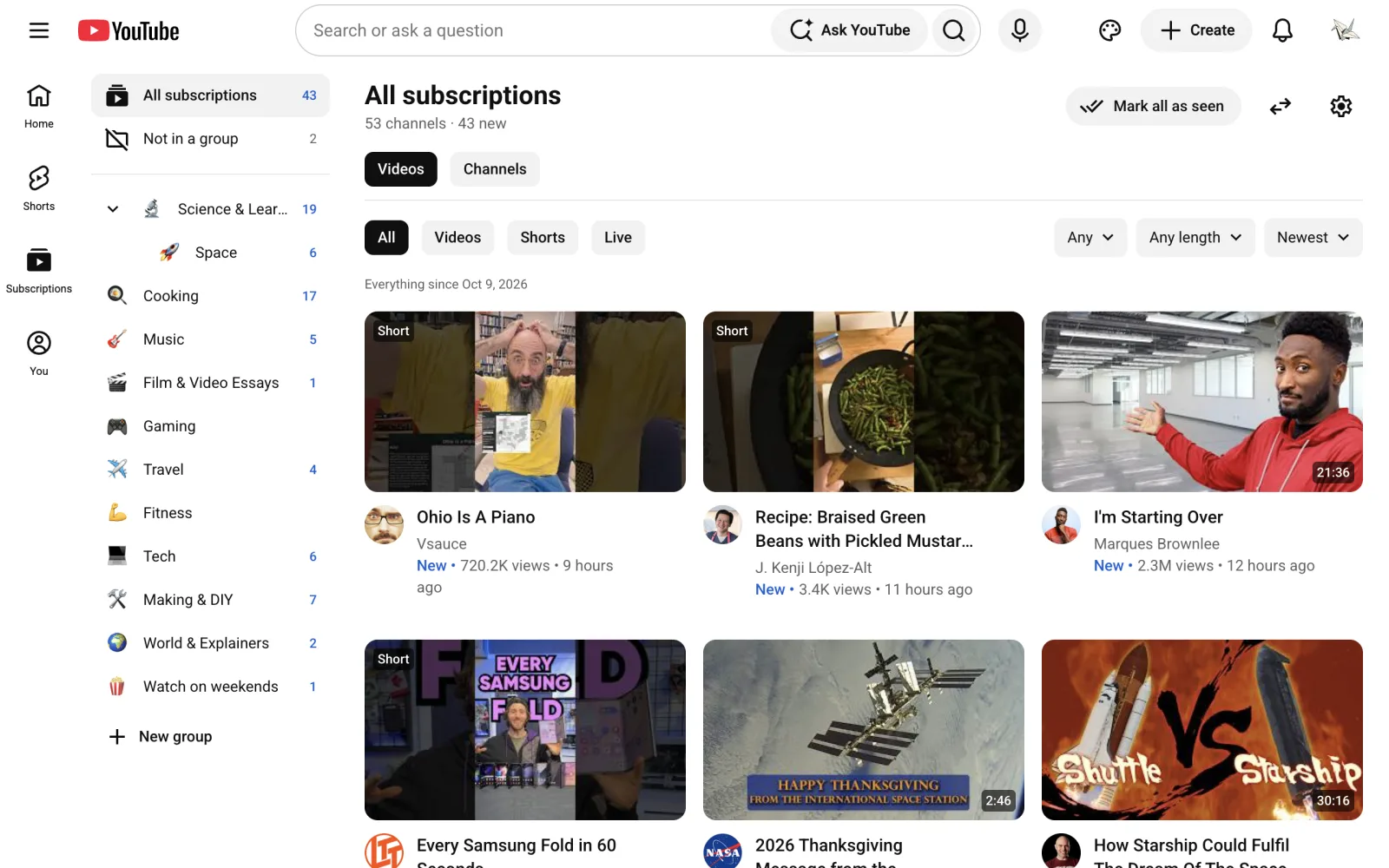
OrigamiTube's subscriptions page: groups such as Science & Learning, Cooking and Music on the left with unread counts, and the newest videos from all subscriptions on the right
Why we built this

Your subscriptions keep growing. YouTube's feed doesn't keep up.

01

One endless list

Follow a few hundred channels and the videos you care about get buried. YouTube has no way to sort channels by topic.

02

Shorts in everything

Shorts, streams and regular uploads all land in the same feed, and there's no simple way to see just the videos you want.

03

Channels that went quiet

Channels you followed years ago are still on the list. Finding them means scrolling, and unsubscribing means one channel at a time.

Features

Built around groups, everywhere you use YouTube.

OrigamiTube replaces YouTube's subscriptions page with a group manager and adds your groups to the rest of the site. You can switch back to YouTube's own page anytime.

A feed for every group

Open a group and see only new uploads from its channels, newest first. Videos you haven't seen yet are marked New.

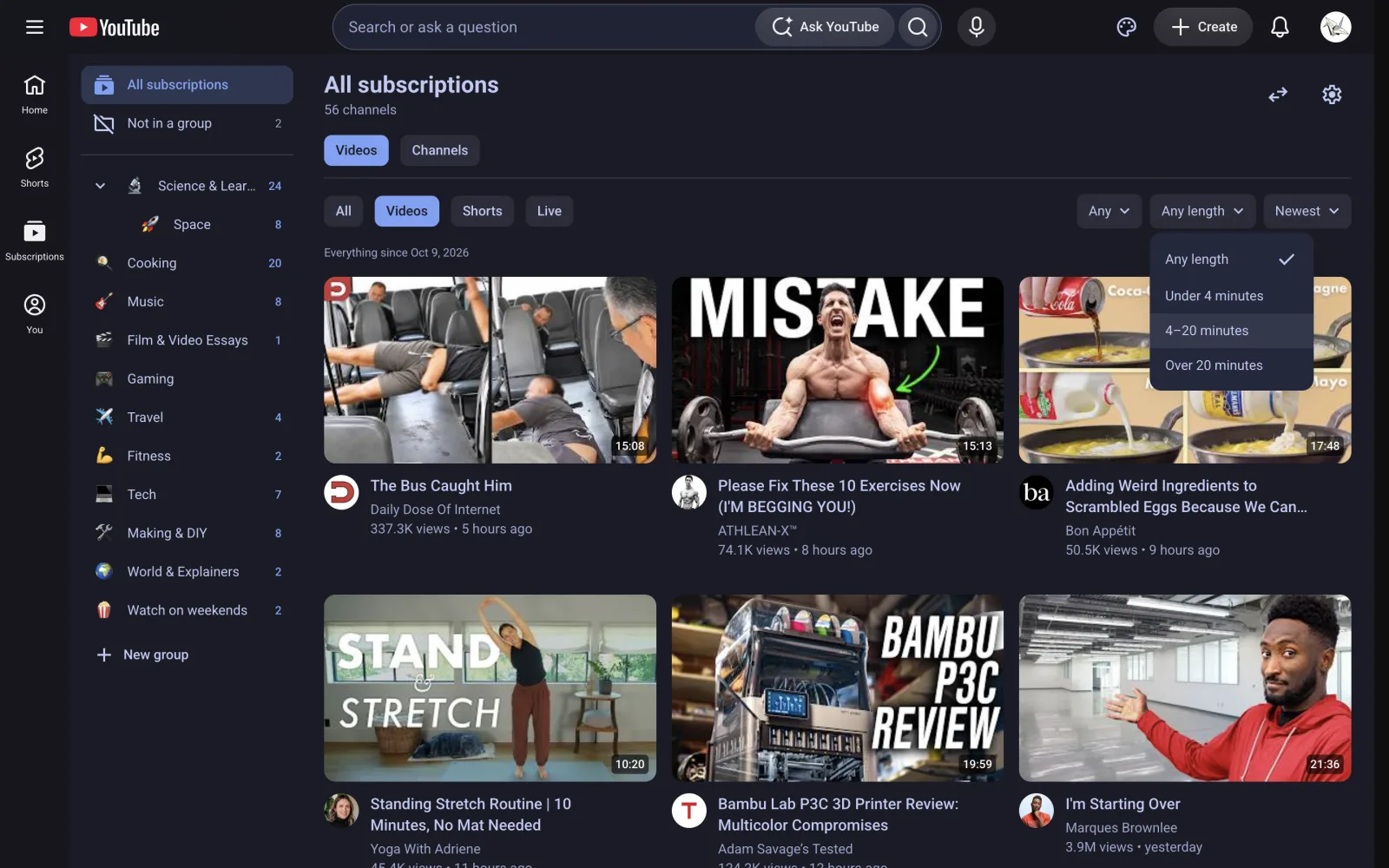
  • Show All, Videos, Shorts or Live, or hide Shorts by default
  • Filter by watched and by length, and sort by date, views or length
  • Shows how far back the feed is complete, and loads earlier videos on request
  • Mark all as seen in one click, and browse pages instead of endless scrolling
A group feed in the Tokyo Night theme, showing only regular videos, with the length filter open

Your groups, right in YouTube's menu

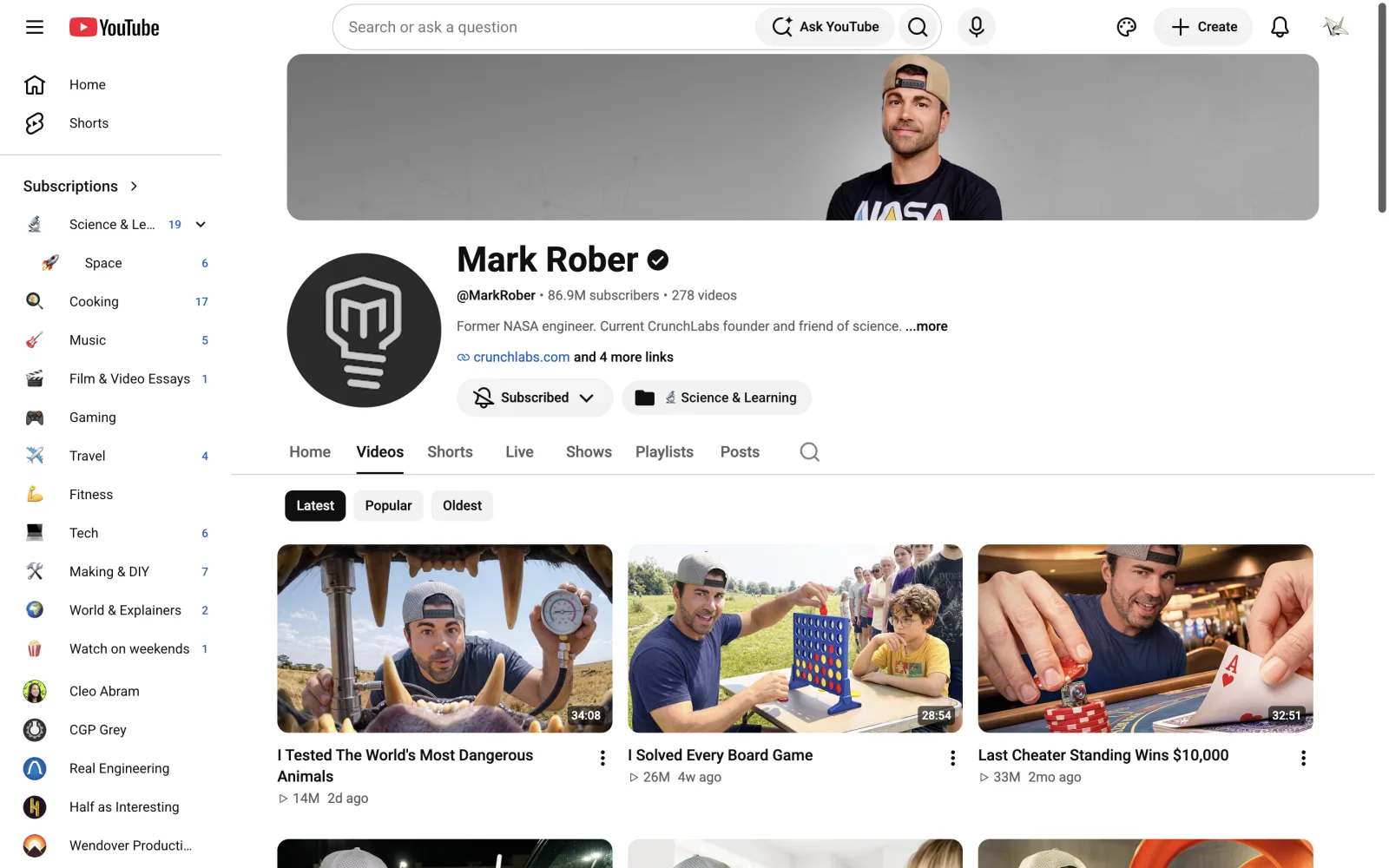
Groups show up in YouTube's left sidebar under Subscriptions, with the number of new videos next to each one.

  • One click opens a group's feed, from any YouTube page
  • Subgroups fold away under their parent group
  • Show every group, only top-level groups, or none
YouTube's left sidebar on a channel page, listing groups such as Science & Learning and Cooking with new-video counts

Add a channel to a group from its page

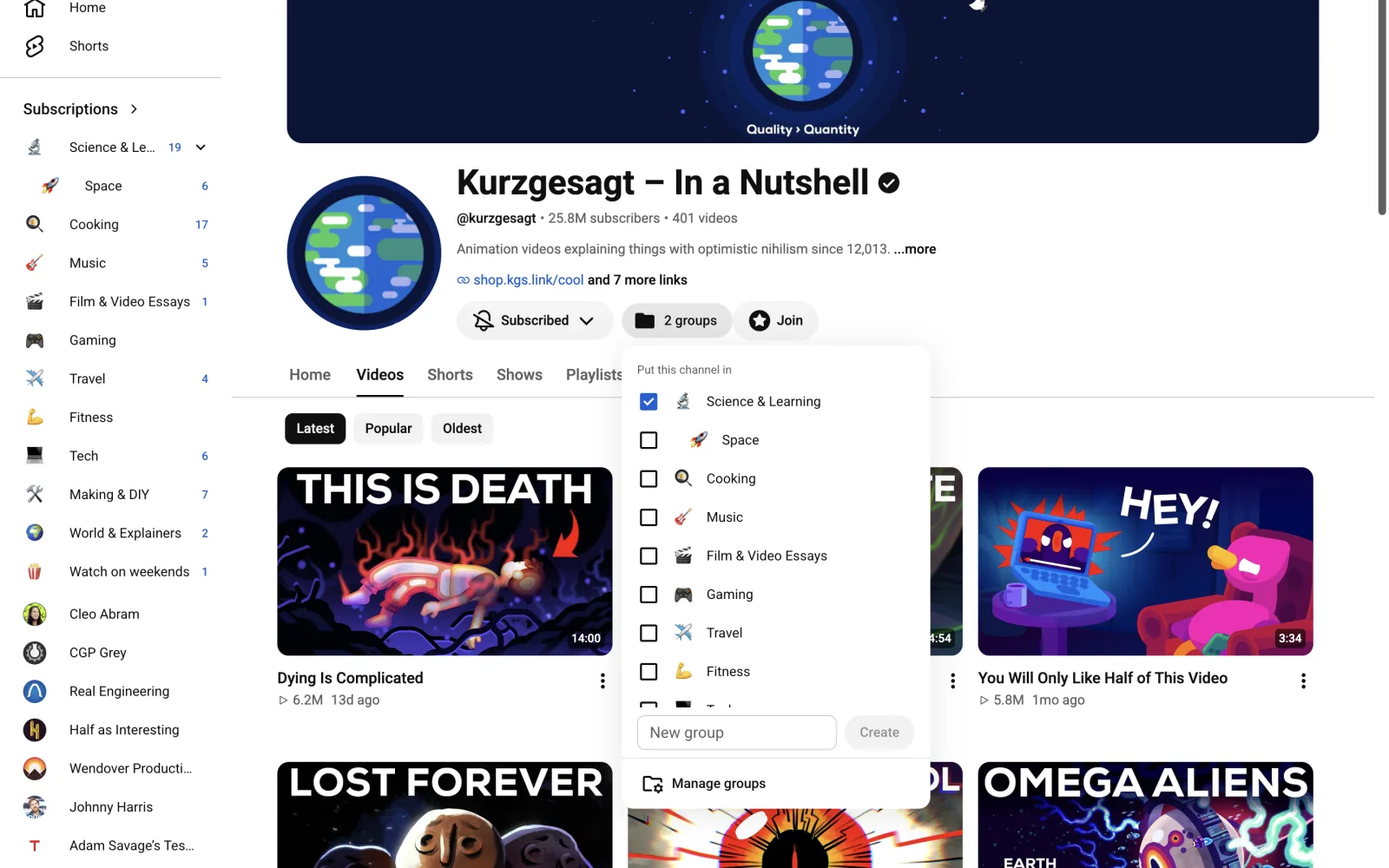
A Groups button sits next to Subscribe on every channel page and video. Pick a group, or create one, without leaving the page.

  • Put one channel in as many groups as you like
  • Works before you subscribe, too
  • Shows which groups a channel is already in
The Groups menu open on a channel page, with Science & Learning checked and a field to create a new group

Clean up subscriptions in bulk

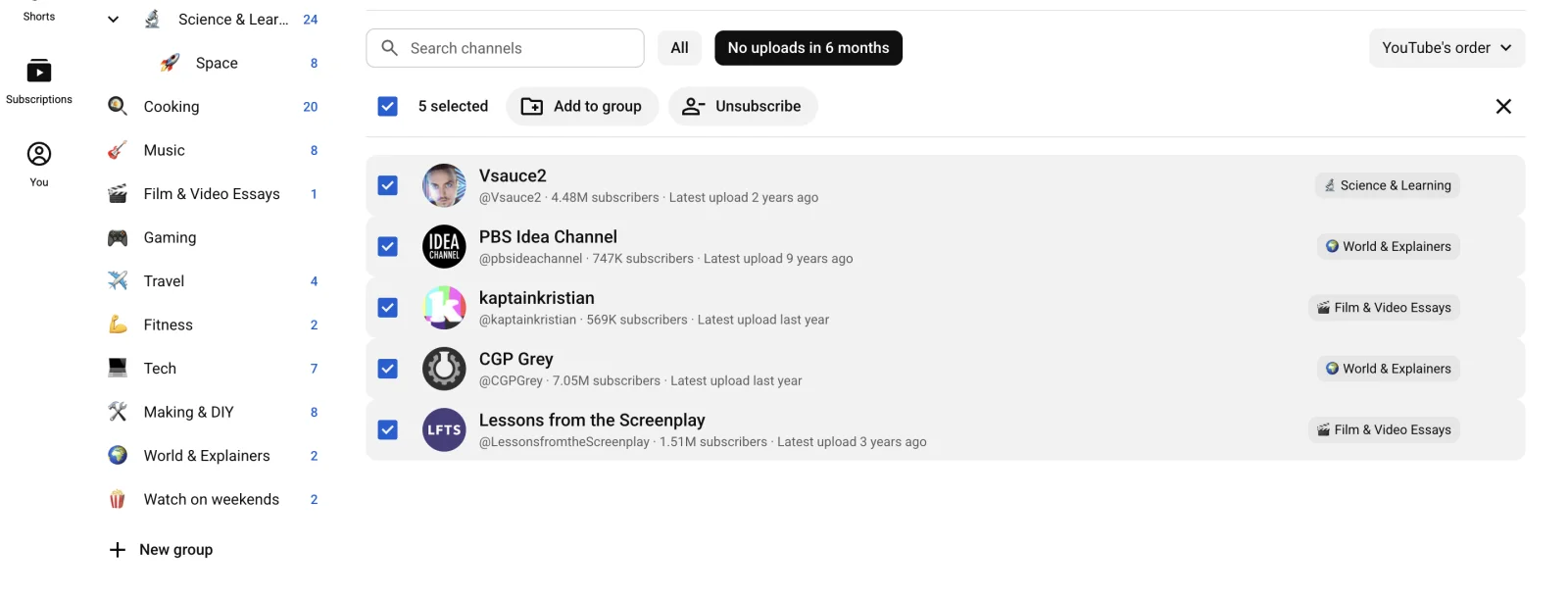
Find channels with no uploads in six months, select them, and unsubscribe in one go.

  • Requests are paced so YouTube doesn't block them, with a progress bar and Undo
  • Unsubscribed channels stay greyed out in their groups, so resubscribing puts them back
  • Search channels, sort them, and add many to a group at once
The Channels tab filtered to channels with no uploads in 6 months, with five channels selected and an Unsubscribe button
The details

The small things that make it work.

Groups inside groups

Nest groups up to four levels deep, and give each one an emoji icon.

Drag and drop

Drag channels from your list onto any group in the sidebar.

Your own channel order

Arrange channels by hand, or sort them A–Z, by latest upload or in YouTube's order.

Separate for every account

Each YouTube account and brand account keeps its own groups.

Back up your groups

Export them to a file, then import into another browser. Merge with existing groups or replace them.

Not in a group

A built-in list of channels you haven't sorted yet, so none slip through.

Hide what you skip

Mark videos as watched or unwatched, or hide the ones you're not interested in.

Pages, not endless scrolling

20, 40, 60 or 100 videos per page. Jump straight to the page you want.

Privacy

Your subscriptions stay between you and YouTube.

We don't run a server that sees your subscriptions or your groups. Read the privacy policy

Runs in your browser

Groups, watch marks and caches are saved in your browser's own storage, separately for each YouTube account.

No extra login

It uses the YouTube session you're already signed in with. No password, API key or Google permission prompt.

No tracking

No analytics, no telemetry, no ads. We never see your subscriptions or what you watch.

Minimal permissions

Only storage and www.youtube.com. It can't see any other site you visit.

Themes, included

Give all of YouTube a new look.

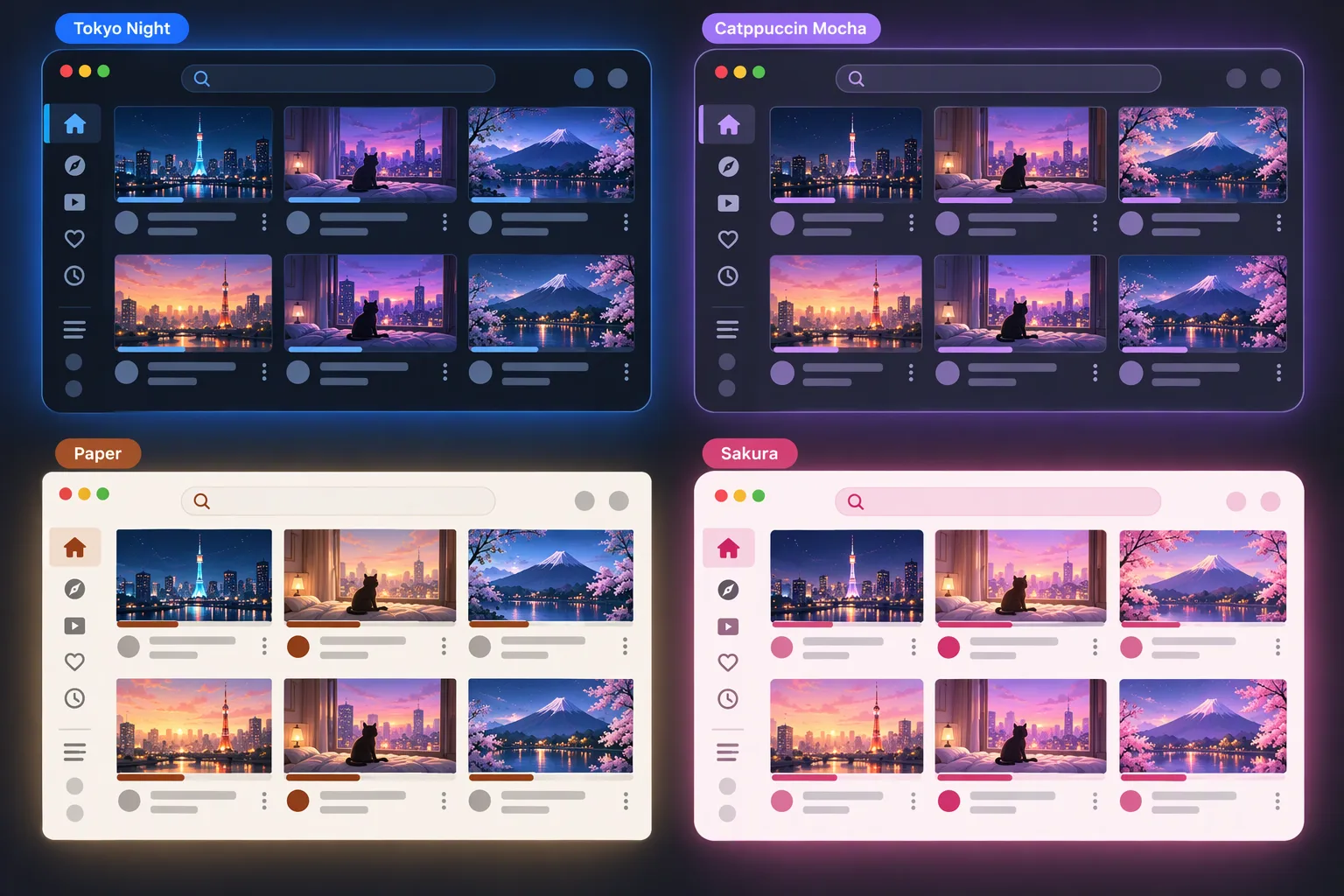
11 themes recolor the whole site, from the home page to the player's progress bar. They're free in OrigamiTube. Try one here and this page changes with it.

Now showing: YouTube Dark

The same YouTube home page in four themes: Tokyo Night, Catppuccin Mocha, Paper and Sakura
Pricing

Free. No limits, no pop-ups.

Every feature on this page is free, with as many groups and channels as you like. No account, no trial and no upgrade screens.

FAQ

Questions

Does it change my YouTube subscriptions?

Only when you unsubscribe, and it asks first. Groups exist only in OrigamiTube, so creating, renaming or deleting a group changes nothing on your YouTube account.

Where are my groups saved?

In your browser, for each YouTube account separately. Uninstalling the extension deletes them, so export a backup from Settings first if you want to keep them or move them to another browser.

Do I need to sign in or give it access to my Google account?

No. It works with the YouTube session you're already signed in with, inside the YouTube tab. There's no separate login, API key or Google permission prompt.

Will it slow YouTube down?

It checks for new uploads in small batches, keeps what it finds in a local cache, and pauses in background tabs. Pages show 20 to 100 videos at a time instead of growing forever.

Can I go back to YouTube's normal subscriptions page?

Yes. The switch button at the top of the page takes you to YouTube's own view, and the toolbar popup can turn OrigamiTube off completely.

Does it work with several YouTube accounts?

Yes. Each account and brand account has its own groups, and they never get mixed up.

Is it really free?

Yes. Everything on this page is free, with no limits on groups or channels. If we add paid extras one day, they'll be optional and won't come with nag screens.

How is this related to the OrigamiTube Playlist Organizer?

Same team, separate extension. The Playlist Organizer is for your playlists, this one is for your subscriptions. They work fine side by side.

Give your subscriptions some order.

Free, private, and right inside YouTube.

Add to Chrome, it's free