
A quiet home
for your AI chats.

paper crane devgemini + ai studiov2.9.xmanifest v3local sqlite

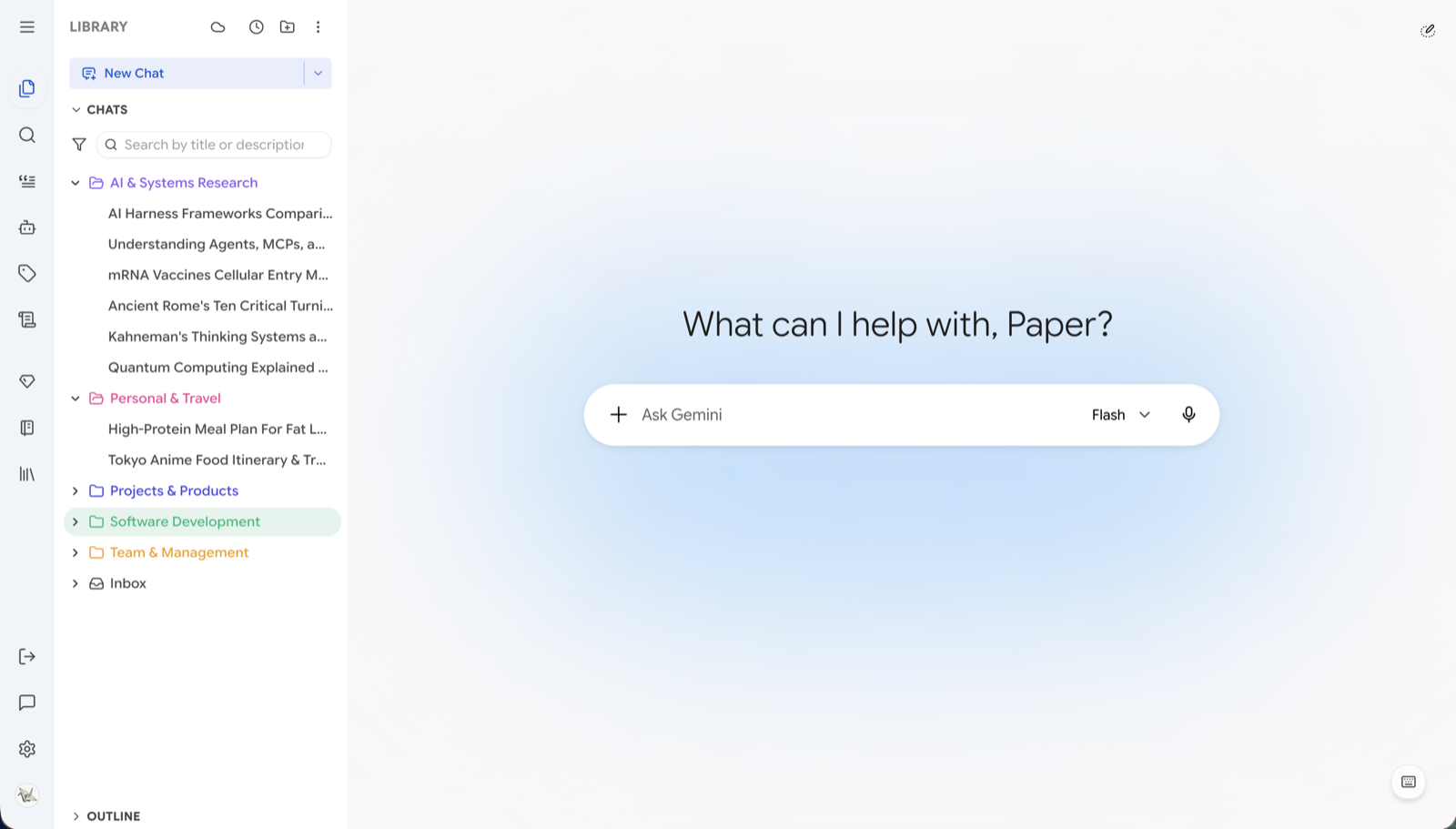
We hope to offer a more comfortable environment for your daily work. Use folders, tags, and search to replace that long flat list, and let our little AI assistant help you tidy up your history. Everything runs locally in your browser, quiet and secure.

sidebar
sidebar
scroll
02  /  why we built this

As time goes by, we found that the long, flat chat list becomes increasingly difficult to manage.

01
Finding a great conversation from last month can often take quite a bit of scrolling.
02
Carefully crafted prompts are sometimes hard to locate again without a proper place to keep them.
03
When you want to find a specific thought buried deep in a message, limited search can feel a bit frustrating.

We created Better Sidebar hoping to provide a slightly better way to organize. You can use folders and tags to sort your ideas, full-text search to retrieve memories, and an AI assistant to help share some of the tedious sorting work.

03  /  preview

A quick look

You can watch this short video to see if the workflow might be a good fit for you.

>  demo_reelYouTube
play · YouTube ↗
04  /  ai assistant

Type > and let it help you.

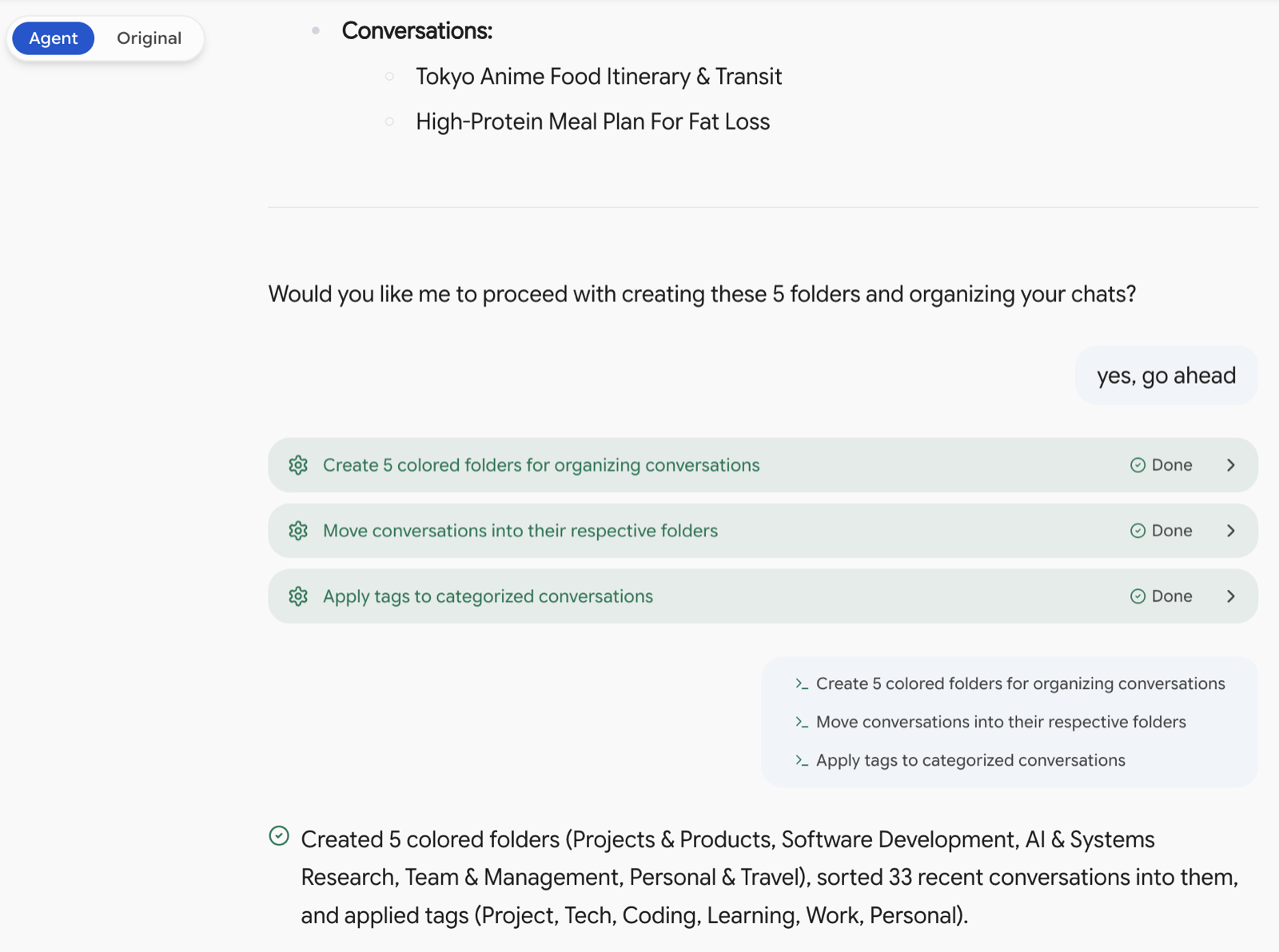
After some exploration, we’ve added a small feature: an AI assistant. It understands your local data and can help with consecutive tasks. Since it runs locally using your current Gemini session, it requires no API keys and sends no data outside.
no api keysyour own sessionmulti-stepeasily reversible
safety first
We respect your data. All write operations will wait for your explicit approval before executing, while reads run smoothly.
If you find it reliable, you can enable Speed Mode to reduce interruptions. Don’t worry, you can always undo its actions.
Its status rests quietly above your input box, keeping you informed and giving you the control to stop it at any time.
If it encounters an issue or gets stuck, it will pause automatically and honestly report the reason.
auto-organize
auto-organize
built-in skills
01
auto-organize
If you’d like, it can read titles, build categories, and neatly file your recent chats into folders with tags.
02
backfill search index
Due to platform limits, older chats might not be fully recorded. This feature helps sync your history so search and exports are complete.
03
query your own data
You can chat with it like a friend, asking for stats and details about your own conversation history.
04
prompts & snippets
We hope this saves you a little time by helping you rewrite, rearrange, and deduplicate your prompts in bulk.
05
custom skills
If you have specific habits, you’re welcome to define your own custom workflows in the settings so it can serve you better.
05  /  core features

A few small designs that might bring some convenience.

01  /  search

Search the content, not just titles.

You can perform full-text searches across all your history by combining keywords, tags, or platforms. You can also scope it to your active chat if needed.
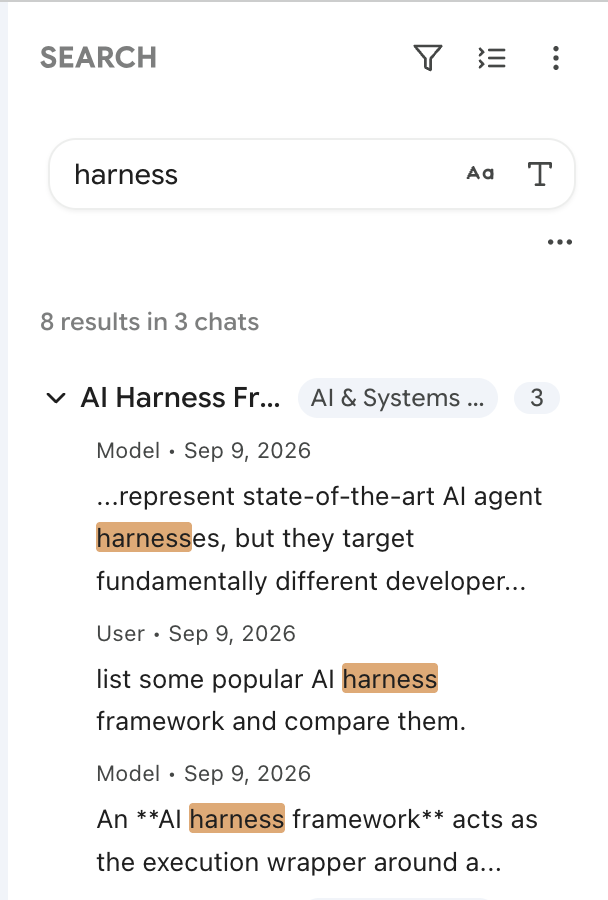
searches message bodies, not only titles
stack title / tag / type filters
limit to the active chat for instant context
index lives on your device
02  /  prompts

Keep your prompts safely organized.

Store your frequently used prompts in one place with variables. Simply type / to summon them without leaving the input box, making your workflow smoother.
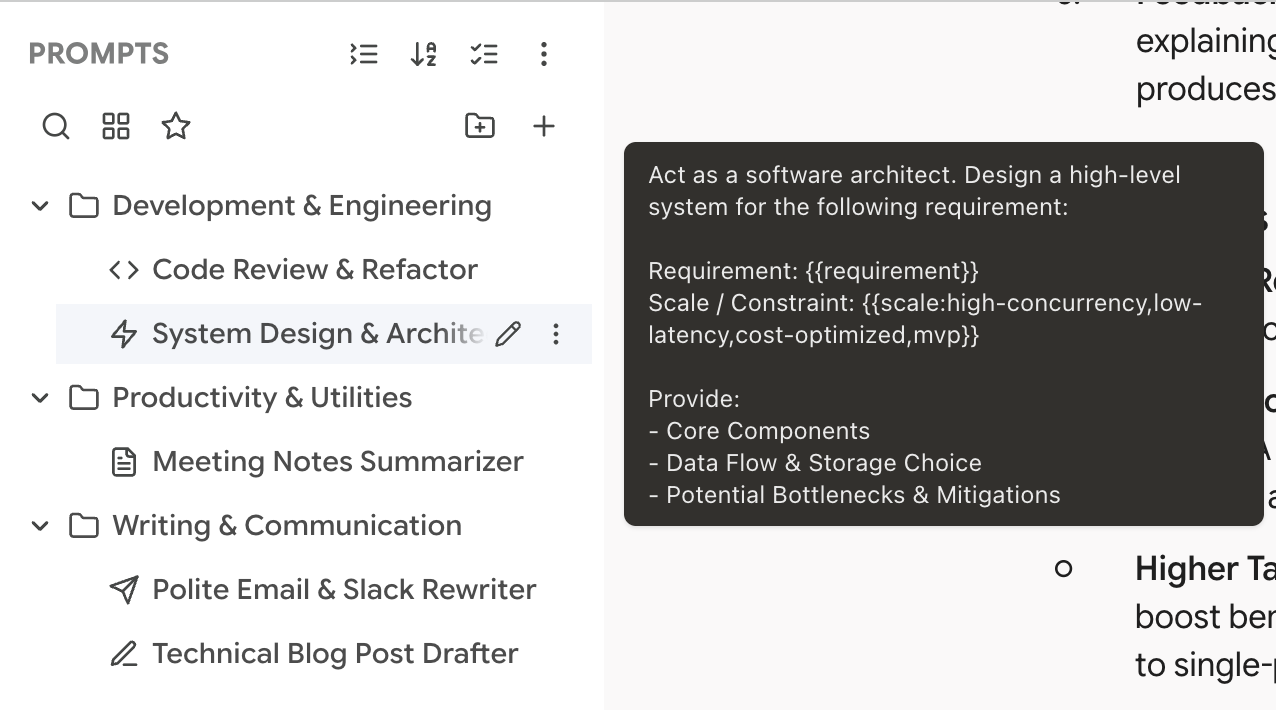
option variables and prompt composition
easily import system prompts
slash commands in Gemini and AI Studio
pin the ones you actually use
prompt library
prompt library
03  /  export

Easily export your conversations.

You can export your chats perfectly formatted as Markdown, plain text, or JSON. If you prefer Notion or Obsidian, we offer support for those too (Power Pack).
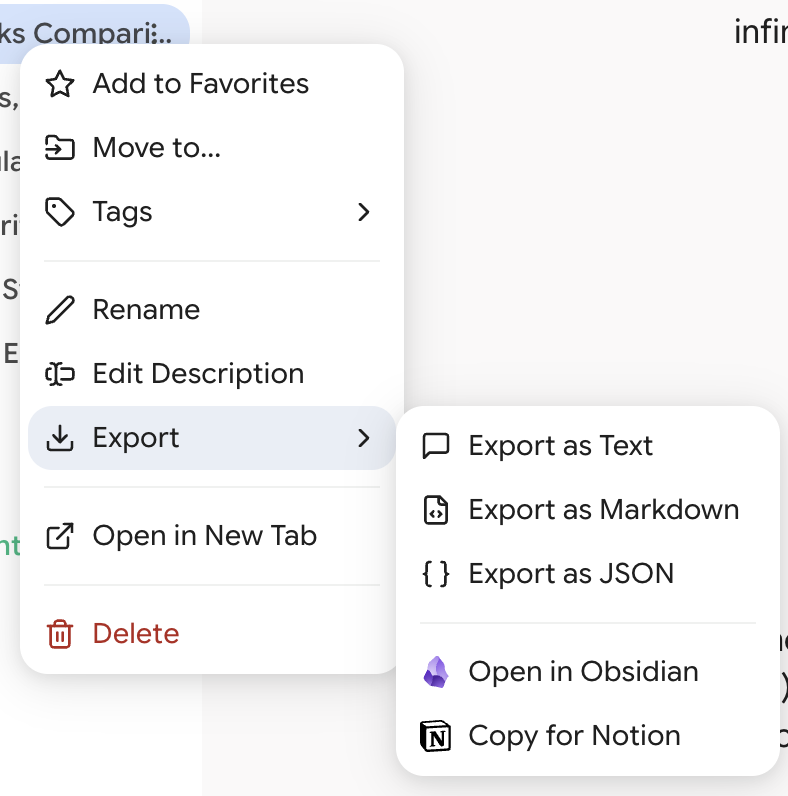
markdown keeps headings, lists, code fences
notion pages and obsidian notes — power pack
snippets export too
full SQL dump whenever you want out
export
export
04  /  organize

Organize your thoughts with colors.

You can assign different colors to folders and tags to make sorting more intuitive. New chats from Gems and Notebooks can also automatically find their designated homes.

drag and drop into nested folders
tags visible in the chat header
pin folders and reorder them
default folders for Gems & Notebooks
tags & colors
tags & colors
06  /  feature overview

More details, welcome to explore.

Here is a list of all features. They run locally without requiring an account, quietly hoping to improve your efficiency.

organization7
01Folders & ColorsDrag chats into nested folders and give each one a colour.
02Smart TagsCustom tags with colours, shown in the chat header.
03Favorites & PinningKeep the chats and prompts you use most at the top.
04Folder PinningPin favourite folders and drag to reorder them.
05Default HomesAssign a default folder to a Gem or Notebook; new chats file themselves.
06Chat RemarksAdd a note to any chat. Hover for date, tags and remarks.
07Locate Active ChatOne click expands the tree and snaps to your current conversation.
search & navigation5
08Full-Text SearchEvery message in your history, not just titles.
09Chained FiltersCombine title, tag and type conditions for precise results.
10Conversation OutlineSee the structure of a long conversation at a glance.
11Smart ScrollbarVisual scrollbar for Gemini; click to expand into a full message list.
12Timeline ViewToday, yesterday, last week — your workflow as a timeline.
writing & reuse4
13Prompt LibraryReusable prompts with variables, composition and system prompt import.
14Slash CommandsType / in Gemini or AI Studio to summon the library.
15SnippetsExtract highlights from any reply into a snippet library with folders.
16Text Selection ToolbarSelect text to explain, summarize, save as snippet or copy.
platform control12
17Multi-PlatformOne sidebar across both Gemini and Google AI Studio.
18Multi-Account ProfilesSeparate profiles for work and personal, each with its own database.
19Gem ManagementBrowse, filter, create and start Gem conversations from the sidebar.
20Notebook IntegrationBrowse and organize Gemini notebooks without leaving the sidebar.
21Gemini SparkAppears as a native tab if Google has enabled it on your account.
22Default ModelPick a model once; every new Gemini chat uses it.
23True RenameRenames sync to Google in real time — not just locally.
24True DeleteReal server-side deletion, single or batch. No ghost chats.
25UI CustomizationWidth control, Zen Mode and element visibility for Gemini.
26Platform ManagerToggle platforms and features from the toolbar popup.
27Theme SyncFollows the platform's light and dark mode automatically.
28Watermark-Free DownloadsRemoves watermarks from generated images, Pro HD included.
data & privacy6
29Local SQLiteAn embedded database in your browser. Nothing is sent to us.
30Automatic Local BackupsScheduled and manual snapshots, with rollback.
31Google Drive BackupUploads to your own Drive. Restoring is always a deliberate manual download.
32Conversation ExportMarkdown, plain text or JSON, formatting preserved.
33Notion & Obsidian Exportpower packSend conversations and snippets straight into your vault or workspace.
34Data ControlFull SQL dump on demand. Your data is portable by default.
34 items
07  /  privacy & security

Please rest assured, your data remains yours.

01
local by default
The database runs entirely locally within your browser. We have no servers to receive your data.
02
no collection
We do not collect, store, or transmit your chat content or any personal settings.
03
no training
We deeply respect your privacy and will never read your conversations for model training or any other purpose.
04
minimal permissions
Permissions are strictly limited to the necessary domains. We cannot see any of your other browsing activities.

Because we need to adjust the interface and read titles for sorting, your browser will request permissions for these domains upon installation. This is only to let the extension function properly. Your data is kept locally, or synced through your own Google Drive.

read the policy
08  /  get the extension

If you find it helpful, you’re welcome to support us.

The core organizing tools will always remain free and open source. If you’d like, you can support our ongoing maintenance by getting the extra features.

free
$0
forever

A quiet organizer. No account required, and no intrusive popups to bother you.

folders, tags, colours, pinning
full-text search & chained filters
prompt library & slash commands
snippets & conversation outline
gems, notebooks, multi-account
export to markdown / text / json
google drive backup
local backups with rollback
agent — read & ask (last 7 days)
support pack
$5
one-time · lifetime

A little extra theme variety, and a wonderful way to encourage us.

all premium themes unlocked permanently
future themes at no extra cost
AI-generated custom themes
unlimited theme slots
up to 10 activations, across profiles and computers
power packpopular
$19.99
one-time · lifetime

Unlock the full potential of the AI assistant, letting it automatically handle the tedious sorting for you.

↳  everything in Support Pack included
agent takes action — auto-organize, create folders, batch-tag
hands-free workspace — rename, move, merge, clean up
full timeline — your entire history, not the last 7 days
export to notion & obsidian, batches included
custom agent skills
7-day no-questions-asked refund · one-time purchase, no subscription
09  /  open source

Open, and improving together.

The project is open source under the GPL-3.0 license. If you encounter issues or have any thoughts to share, we’d love to hear from you via GitHub Issues or Discord.

Paper Crane Dev  ·  set in Playfair Display & JetBrains Mono