Slash Commands

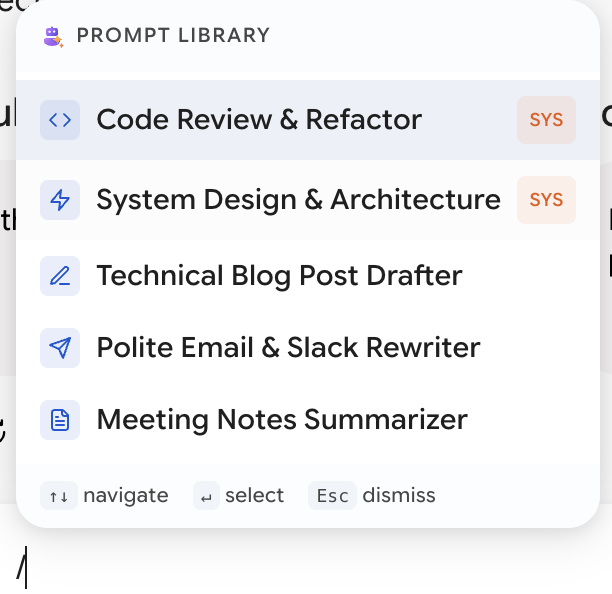
Type / in the Gemini or AI Studio input box and your prompt library appears inline.

Typing a slash in the chat input opens the prompt picker

Keep typing to filter. Arrow keys to move. Enter to insert. The /query text you typed is replaced by the prompt's full content.

Matching

Filtering is fuzzy and multi-word, so /rev code finds Review code for security issues. Matching starts from the beginning of words, which is why title order matters:

TitleFound by
translate-jp/tr, /jp
Japanese translation helper/ja, /tran — but not /jp as quickly
Tip

Put the keyword first. review-security beats My prompt for reviewing code security not because it's shorter but because /rev lands on it immediately. If you're doing one thing to make your library faster to use, it's renaming for this.

Variables Get Filled In

If the prompt contains variables, a small form appears before insertion.

Text variables give you an input box. Dropdown variables give you a select with your predefined options. Fill them, and the resolved text — variables substituted, imports inlined — goes into the input box.

So a prompt like:

Translate the following to {{language:English,Japanese,Spanish}}.
Tone: {{tone:neutral,formal,casual}}.

{{@import:Translation Rules}}

becomes, in three keystrokes and two dropdown picks, a fully-formed instruction with your standard translation rules attached.

Turning It Off

The switch is in the browser toolbar popup — click the Better Sidebar icon next to your address bar, pick the Gemini or AI Studio tab, and toggle Slash Commands. It's per-platform.

Tip

This is the one toggle that isn't in the sidebar's Settings modal, which catches people out. If you're looking for it in Settings → UI Controls, it isn't there. See Platform Manager.

Worth turning off if you frequently start messages with a literal slash — file paths, regexes, dates. Otherwise leave it on.

Empty Library

With no prompts saved, the popup says so and offers a button through to the Prompts tab. Nothing to insert yet.

Building a Library Worth /-ing

A few prompts that pay for themselves immediately:

Suggested titleContent shape
review-codeYour standard code review criteria
explain-simple"Explain this as if to someone competent but unfamiliar. No analogies."
translateWith language and tone as dropdown variables
summarizeYour preferred output shape — bullets, length, what to omit
rewrite-toneTone as a dropdown
commit-msgYour commit message conventions

The test for whether something belongs in the library is simple: have you typed roughly this twice? Then save it. You'll type it again.

  • Prompts — building the library, variables, composition
  • Selection Toolbar — save a good phrasing as a prompt without leaving the conversation
  • Agent — have it refactor a library that's grown unwieldy
Paper Crane Dev  ·  set in Playfair Display & JetBrains Mono